안녕하세요. 오늘은 리액트의 이벤트 핸들러에 대해 알아볼게요.
이벤트 핸들러 (Event Handler)
이벤트 핸들러는 사용자가 웹 페이지와 상호작용할 때(클릭, 입력, 제출 등) 실행되는 함수(Function) 에요.
즉, React에서 사용자의 행동에 따라 특정 동작을 수행하도록 연결하는 역할을 해요.
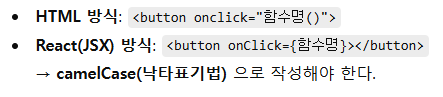
이벤트 등록 방법
1. 함수 이름 전달
버튼 클릭 시 특정 함수가 실행되도록 함수 이름을 전달해요.
<button onClick={handleButtonClick}>클릭해주세요</button>
2. 익명 함수 사용
이벤트에 직접 함수를 정의할 수도 있어요.
<button onClick={() => console.log('버튼 클릭!')}>클릭</button>
이벤트 핸들러 전달 (부모 → 자식)
React에서는 부모 컴포넌트가 이벤트 로직을 정의하고,
자식 컴포넌트는 해당 함수를 props로 전달받아 실행할 수 있어요.
이를 통해 UI(자식)와 로직(부모)의 역할을 분리할 수 있어요.
1. 자식 컴포넌트
interface ButtonProps {
  children: React.ReactNode;
  onButtonClick: () => void;
}

function ButtonComponent({ children, onButtonClick }: ButtonProps) {
  return (
    <button onClick={onButtonClick}>
      {children}
    </button>
  );
}
2. 부모 컴포넌트
function EventHandlerExample() {
  const handleButtonClick = () => {
    console.log('부모로부터 전달받은 이벤트 실행!');
  };

  return (
    <div>
      <ButtonComponent onButtonClick={handleButtonClick}>
        클릭 이벤트 전달
      </ButtonComponent>
    </div>
  );
}
여러 개의 버튼에 개별 이벤트 등록
하나의 컴포넌트를 만들어서 서로 다른 메시지를 전달할 수도 있어요.
interface ConsoleProps {
  message: string;
  children: React.ReactNode;
}

function ConsoleButton({ message, children }: ConsoleProps) {
  return (
    <button onClick={() => console.log(`${message}`)}>
      {children}
    </button>
  );
}

// 사용 예시
<ConsoleButton message="홍길동이 클릭했습니다.">A버튼</ConsoleButton>
<ConsoleButton message="임꺽정이 클릭했습니다.">B버튼</ConsoleButton>
폼(Form) 이벤트
onSubmit 이벤트를 사용하면 사용자가 데이터를 제출할 때 로직을 처리할 수 있어요.
React에서는 기본 새로고침을 막기 위해 e.preventDefault()를 함께 사용해요.
<form onSubmit={(e) => {
  e.preventDefault();
  console.log('전송 완료');
}}>
  <button type="submit">제출하기</button>
  <input type="submit" value="전송" />
</form>
이벤트 핸들러 명명 규칙 (권장)
| 구분 | 용도 | 예시 |
| on으로 시작 | props로 전달받는 외부 이벤트 | onButtonClick, onFormSubmit |
| Handler 포함 | 내부 로직 함수 이름 | buttonClickHandler, formSubmitHandler |
마지막으로 전체 코드 예시에요.
import React from 'react';

// 자식 컴포넌트 (버튼)
interface ButtonProps {
  children: React.ReactNode;
  onButtonClick: () => void;
}

function ButtonComponent({ children, onButtonClick }: ButtonProps) {
  return <button onClick={onButtonClick}>{children}</button>;
}

// 자식 컴포넌트 (메시지 출력)
interface ConsoleProps {
  message: string;
  children: React.ReactNode;
}

function ConsoleButton({ message, children }: ConsoleProps) {
  return <button onClick={() => console.log(message)}>{children}</button>;
}

// 부모 컴포넌트
function EventHandlerExample() {
  const handleClick = () => {
    console.log('버튼을 클릭했습니다.');
  };

  const parentHandler = () => {
    console.log('부모로부터 전달된 이벤트 실행');
  };

  return (
    <div>
      <button onClick={handleClick}>클릭해주세요</button>

      <hr />
      <ButtonComponent onButtonClick={parentHandler}>
        클릭 이벤트 전달
      </ButtonComponent>

      <hr />
      <ConsoleButton message="홍길동이 클릭했습니다.">A버튼</ConsoleButton>
      <ConsoleButton message="성춘향이 클릭했습니다.">B버튼</ConsoleButton>

      <hr />
      <form
        onSubmit={(e) => {
          e.preventDefault();
          console.log('폼 제출 완료');
        }}
      >
        <button type="submit">제출하기</button>
      </form>
    </div>
  );
}

export default EventHandlerExample;

여기까지 리액트의 이벤트 핸들러에 대해 알아봤는데요.
이벤트 핸들러를 배우면서 사용자와의 상호작용을
직접 제어할 수 있어 React의 동적 UI가 어떻게 동작하는지 이해할 수 있었어요.
'Frontend > React' 카테고리의 다른 글
| React Chart Library (0) | 2025.12.06 |
|---|---|
| React Rendering (0) | 2025.12.03 |
| React Props (0) | 2025.12.01 |
| React JSX (0) | 2025.11.30 |
| React Component (0) | 2025.11.28 |